

Allen Cypher and David Canfield Smith
Advanced Technology Group
Apple Computer, Inc.
Cupertino, CA 95014
cypher@apple.com, dsmith@apple.com
KidSim enables children to specify how characters are to
behave and interact by providing a special graphical
interface for specifying the spatial relationships between
characters. In addition, KidSim provides a graphical
interface for creating, testing and manipulating properties,
which maintain information about the character.
User interaction in KidSim is based on several
Programming by Demonstration and Direct Manipulation
techniques. These techniques allow users to create
behavioral rules by demonstrating what the character is to
do in a specific situation.
In this demonstration, we will show how KidSim can be
used to create novel characters and to specify the behavior
of those characters.
We will create characters, draw a variety of appearances,
define some properties, and create behavioral rules based
on these appearances and properties.
For instance, when a character that is facing to the right
encounters an obstacle to its right, we can create a rule to
specify that the character is to change its appearance so that
it faces to the left. Also, we can create an energy level
property, and make a rule that decreases the character's
energy level by 1 every time it takes a step. A rule can also
indicate that the character is able to move only if its energy
level is greater than 0.
KidSim has been used by children and adults to create a
wide variety of simulations. We will demonstrate various
simulations built in KidSim, to show the range of
capabilities of the tool and to show what people of different
ages are able to accomplish with it.
KidSim has been used to simulate fish in the ocean,
creatures in a 2-dimensional world, melting ice, PacMan,
Conway's game of Life, a blocking-strategy game, and a
variety of maze and adventure games.
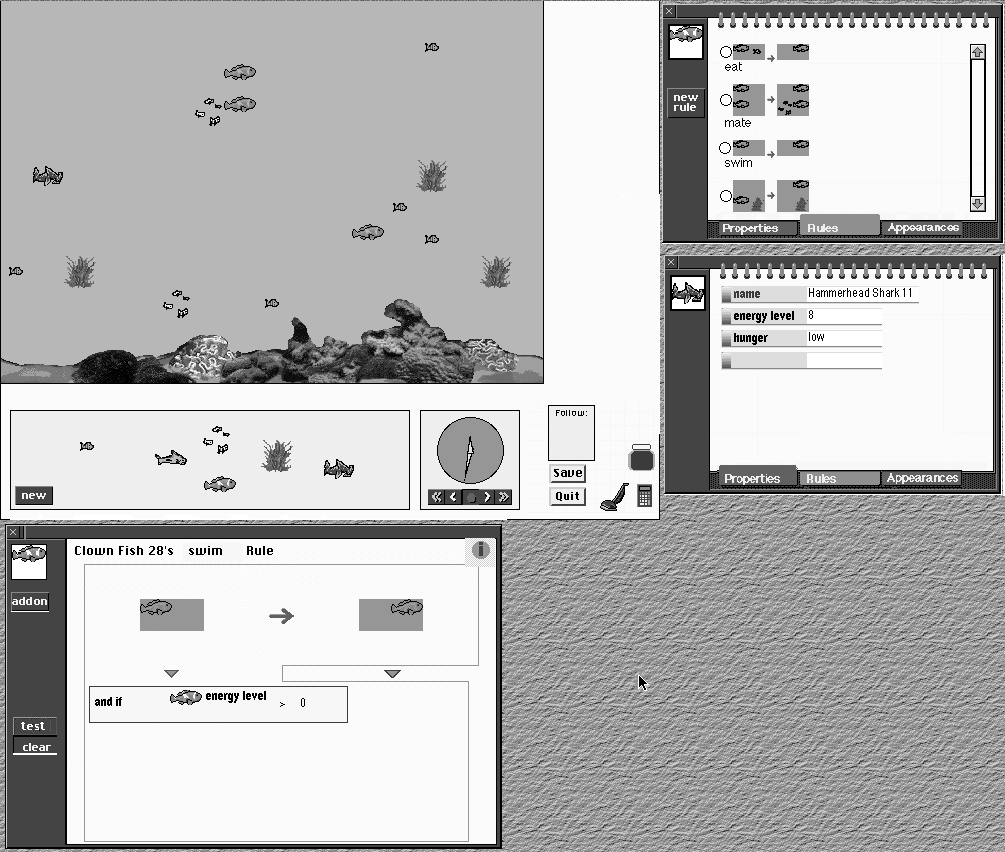
The FIGURE on the following page shows a KidSim screen,
with a simulation of fish in the ocean. The simulation itself
appears in the upper left. On the right, the user has opened two
notebooks, one for a clown fish, and the other for a shark. The
upper notebook is open to the Rules page, showing rules for
eating, mating, and swimming. The lower notebook is open to the
Properties page, showing the character's name, and the user-
created properties of energy level and hunger. At the bottom of
the screen is the Rule Editor, which is displaying the swim rule.
This rule states that if a clown fish has an empty space to its right,
and if its energy level is greater than 0, it will move one square to
the right.
FIGURE 1
No caption given.
For more details and references, please see the paper
"KidSim: End User Programming of Simulations" in the
conference proceedings.
Abstract
KidSim is an environment that allows children to create
their own simulations. They create their own characters,
and they create rules that specify how the characters are to
behave and interact. KidSim is programmed by
demonstration, so that users do not need to learn a
conventional programming language or scripting language.
Keywords:
end user programming, simulations, pro-
gramming by demonstration, graphical rewrite rules, pro-
duction systems, programming by example, user programming.
Introduction
KidSim is an environment that allows children to create
their own simulations. There already exist drawing
programs that allow children to create pictures of
characters, but in order to create interesting simulations,
children must also be able to create behaviors for their
characters. This is traditionally a complex process, since it
amounts to creating programs, and traditional programming
languages are complex and abstract.
DEMONSTRATION
SAMPLE SIMULATIONS IN KIDSIM