



David Wolber, Edward Janne, Kirk Chen
Department of Computer Science
University of San Francisco
2130 Fulton St., San Francisco, CA., 94117-1080
{wolber,eajanne,kchen}@usfca.edu
Pavlov is a programming-by-demonstration (PBD) system
that allows non-programmers to create animated
interfaces. Based on stimulus-response demonstration, it
is the first PBD system to allow real-time animation to be
defined, and it is the first animation system that allows the
interactive part of a presentation to be designed using PBD.
End-User Programming, UIMS,
Programming-By-Demonstration, Animation.
Key-Frame animation systems such as MacroMedia's
Director are based on a score (timeline) representing
graphic events over time. Though originally designed to
create non-interactive animations, that is, animations not
triggered or controlled by the end-user, these systems do
allow some interactive behavior to be defined. However,
the facility is based on unstructured programming with a
scripting language; the difficulties involved significantly
limit the number of people that can use animation systems
to design novel interfaces, presentations, games,
simulations, and educational software.
Conversely, programming-by-demonstration (PBD)
systems [1] ease the definition of interactive behavior by
allowing designers to specify the behavior of a system by
demonstration, instead of programming. However, to date,
no PBD systems have provided support for animation or
the definition of real-time constraints on the processing of
events.
Pavlov is an exploratory system that has added real-time
animation capabilities to a PBD interface builder. Based
on a methodology called stimulus-response demonstration
[2], both interactive and non-interactive animations can
be defined in a uniform manner without programming.
Furthermore, a designer can define more complex behaviors with Pavlov than can be defined with
traditional key-frame animation systems.
In Pavlov, an interface is modeled as a stimulus-response
machine. A stimulus is defined as an end-user initiated
event (e.g., button-click, move, rotate) or the passing of
time. A response is defined as one or more time-stamped
graphics operations (a series of moves is a traditional
animation sequence).
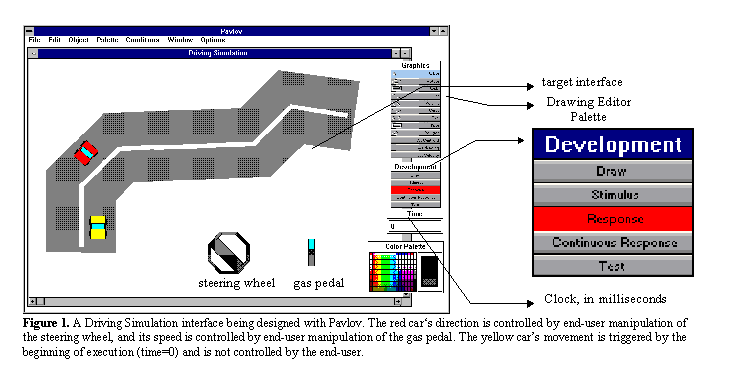
Interfaces are created by demonstrating stimuli and
responses using a drawing editor, a clock, and a
development mode palette (see Figure 1). The mode
palette allows the designer to specify whether he/she is
drawing the initial interface, demonstrating a stimulus,
demonstrating a response (animation), or testing the
interface. In Stimulus mode, the designer can either
perform some mouse or drawing editor operation to
demonstrate that the upcoming response should be
triggered by an end-user event, or he/she can set the clock
to demonstrate that the response should be triggered by
the passing of time. After demonstrating the stimulus, the
designer demonstrates the response with either a
continuous motion (similar to real-time recording in
Director) or a series of discrete drawing editor operations.
The system generalizes each demonstration and
automatically creates an interface that behaves as it was
"taught". In Test mode, the development tools disappear
and the designer is able to check whether the target
interface behaves as desired.
Because stimuli are demonstrated explicitly with a
drawing editor, a response sequence (animation) can be
triggered by many different stimuli (e.g., move, rotate,
etc.). For instance, the designer of the Driving Simulation
interface in Figure 1 demonstrated a stimulus of the end-
user rotating the steering wheel, then demonstrated that
the system respond by rotating the red car. At run-time,
the end-user can control the direction of the red car by
rotating the wheel. In presentations created with Director,
the end-user can only click on objects to trigger
animations, and cannot control animations with other
types of manipulation.
Any drawing editor operation can also be demonstrated as
a response, including some special operations for
controlling the speed of an animation sequence. For
instance, in the Driving Simulation, the designer
demonstrated a stimulus of stepping on (unstretching) the
gas pedal, and a response of accelerating the speed of the
red car. This capability allows the designer to give the
end-user control of the speed as well as the direction of
animation sequences.
FIGURE 1
A Driving Simulation interface being designed with Pavlov. The red car�s direction is
controlled by end-user manipulation of
the steering wheel, and its speed is controlled by end-user manipulation of the gas pedal. The yellow car's
movement is triggered by the
beginning of execution (time=0) and is not controlled by the end-user.
Since both the stimulus and response are demonstrated
explicitly, Pavlov can infer relationships between the
parameters of these operations. For example, in the
Driving Simulation, when the designer demonstrates the
rotation of the wheel as a stimulus, and the rotation of the
car as a response, Pavlov automatically computes a
proportional constant so that at run-time the car turns an
amount proportional to the amount the steering wheel is
rotated. Though only linear relationships are inferred,
textual editing capabilities are provided so that, if desired,
the designer can specify more complex formulas for
response parameters.
Pavlov also infers dynamically created objects and
graphical contexts. The designer specifies dynamic
objects by demonstrating the creation of an object as a
response. This facility allows for the creation of
applications such as graphical editors.
The designer specifies a graphical context by configuring
the interface so that some condition is exhibited before a
demonstration. For instance, in the Driving Simulation,
the designer drew the outer rectangle of the gas pedal
before demonstrating the behavior of the inner rectangle.
Then, the designer stretched the inner rectangle as
stimulus, ensuring that it stayed within the boundaries of
the outer rectangle. From the demonstration, Pavlov
inferred that the manipulation of the gas pedal should be
constrained.
With Pavlov, the driving simulation interface shown in
Figure 1 can be created in less than fifteen minutes. To
our knowledge, this interface cannot be created using any
other development tool without extensive programming.
Preliminary usability tests have shown the stimulus-
response framework to be very intuitive; new users,
including those with no programming experience, have
been able to design complex interfaces like the driving
simulation after just an hour or two of tutoring.
Pavlov does not contribute any new non-interactive
animation techniques; in fact, some features common to
traditional animation systems (e.g., in-betweening, slow-
in/slow-out transitions) have yet to be added. Instead,
Pavlov's contribution is that it successfully applies PBD
technology to a new domain, that of interactive animation
(or animated interface) design. We feel the next
generation of animation systems and interface building
systems can benefit greatly from incorporating the
stimulus-response framework into their systems.
Abstract
Keywords:
Introduction
OVERVIEW
CONCLUSION