

Maria Capucciati, Patrick Curran, Kimberly Donner O'Brien, and Annette Wagner
SunSoft
2550 Garcia Ave., MTV 21-225
Mountain View, CA 94043-1100, USA
415 336-5358 or 415 336-7255
Email: maria.capucciati@eng.sun.com, patrick.curran@eng.sun.com
In terms of the design, the most obvious challenge faced by the Mailer team was the change from SunSoft's
OPEN LOOK graphical user interface to Common Desktop Environment Motif (based on OSF Motif 1.2).
The two toolkits have different widget sets and behaviors. The design also had to be compliant with the
newly-emerging Common Desktop Environment Style Guide, which defined the look and feel of the new
environment. The team took advantage of existing usability data in redesigning aspects of the interface
which were known to be problematic for end users. The e-mail software developed for the Common
Desktop Environment had to satisfy the needs of a variety of end users, from UNIX hackers to novice
computer users and users migrating from other e-mail applications, including SunSoft's Mail Tool.
The SunSoft Mailer team also organized a weekly meeting in order to coordinate the range of activities.
Software developers, human interface engineers, and technical writers converged to discuss design issues,
implementation problems, and schedules that were too complex to be worked out in hallway conversations
or e-mail exchanges. In retrospect, although the meeting was useful for resolving issues that dragged on too
long via e-mail, it never had a clear charter. Leadership of the meeting fluctuated: it was not clear whether it
was meant to resolve design or development concerns.
True design collaboration was clouded by an ongoing debate regarding ownership of the interface, an issue
never fully resolved. Some team members thought that all design decisions, no matter how trivial, had to be
reached by team consensus. These discussions were aggravated by the fact that the human interface
specifications had to describe what was being implemented to a great degree of detail. This frequent
discussion of interface details produced extra work for the team and hesitation on the part of the interface
engineers.
Although the debates often concentrated on specifics of Mailer (such as interface components or
terminology), we also faced issues common to many interface design efforts: designing for user groups with
disparate characteristics, designing a new interface that remains usable by users of the old interface, and
improving relationships between software developers and human interface engineers. In terms of designing
for user groups with disparate characteristics, we found that members of the team seemed to be biased
towards designing for particular user groups (such as end users or developers) closer to their own
characteristics. Although we were interested in designing a new interface that remained usable by users of
the old interface, we ran up against an interesting twist in this attempt: there were people who were
comfortable with the functionality of Mail Tool and who attempted to propagate the old user model.
All these interactions were heightened by a sense of immediacy: the team had roughly a year to produce an
e-mail application for the Common Desktop Environment.
The first browsing model we considered for Mailer used double-click to display mail messages in the lower
section of the combination window. This lower section was referred to as the "message pane". However, in
most graphical user interfaces, double-click means "open another window". In addition, the classic browser
model uses a single mouse click to select and display (a la the Xerox Smalltalk browser).
Furthermore, comparative analysis data convinced us that we would have to accommodate two predominant
reading styles: those users who preferred to browse through messages quickly, re-using one window to do
so; and those who preferred opening messages into separate windows.
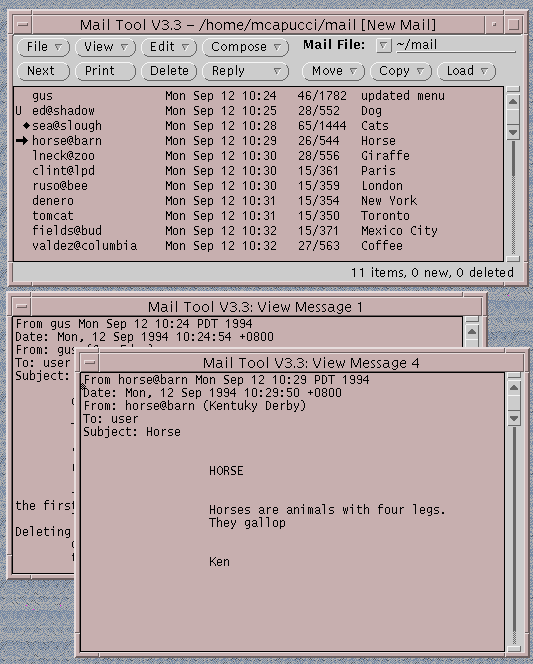
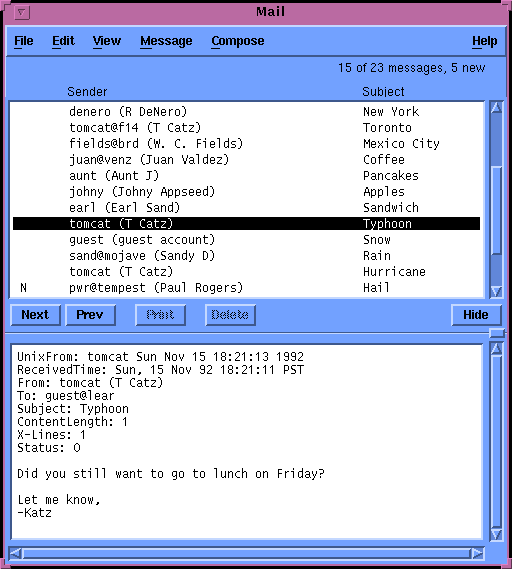
As part of the design process, the team decided to prototype the two approaches and test them on users. We
called our prototypes "Fat Boy" (each message opened into a separate window) and "Little Man" (each
message was displayed in the lower message pane). Screen shots of Fat Boy and Little Man are shown in
Figures 1 and 2. In Fat Boy, single-clicking only selected a message and double-clicking opened each
message into a separate window. In Little Man, however, single-clicking selected and displayed the message
in the lower message pane. Double-clicking opened each message into a separate window. In addition, we
experimented with using a push-button to "hide" and "show" the lower message pane.
FIGURE 1.The "Fat Boy" prototype - text of each message appears in a separate
window.
FIGURE 2. The "Little Man" prototype - text of a message appears in the lower pane of the
window.
Our usability testing showed that users of both camps were satisfied with the dual interaction mode that
Little Man gave them. Those who preferred a "reusable window" style easily learned and consistently used
the single-click model. We found that test participants who were accustomed to double-clicking to view
messages preferred the "separate window-per-message" model. These participants used the Hide button to
eliminate the message pane and continued to use the double-click model they were familiar with.
As a result of the user testing data and many other considerations, the team ultimately decided to use a
modified version of the Little Man prototype for our final version of Mailer. Single-clicking displayed a
message in the lower pane and double-clicking created a new window in which the message was displayed.
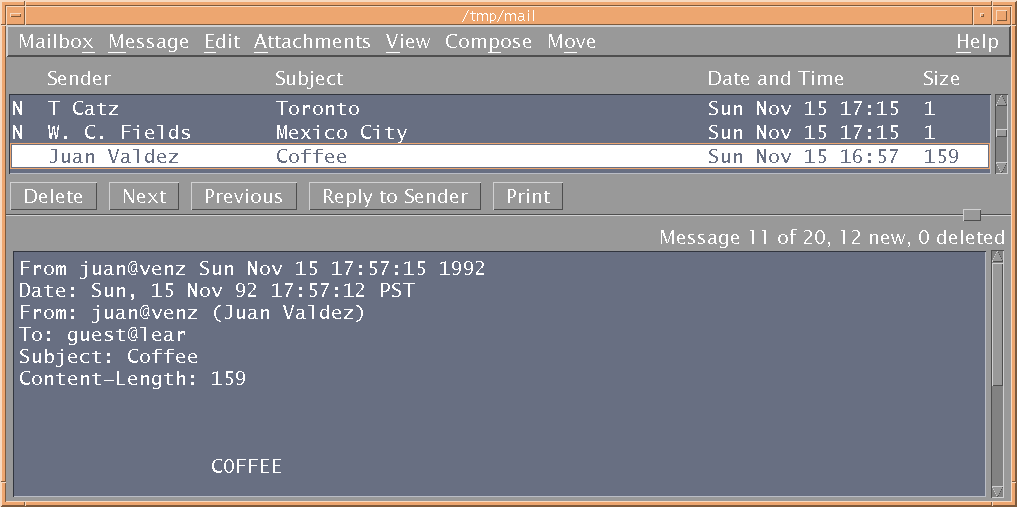
A screen shot of Mailer is shown in Figure 3.
FIGURE 3. The Mailer application for the Common Desktop
Environment.
The decision was not arrived at easily, primarily because some team members were reluctant to endorse a
model with which they were not familiar. This unease concerning the decision persisted throughout the
design year, forcing some post-decision brainstorming sessions to discuss the validity of our design choice
and other issues which arose from the new selection model.
We wrote up four potential scenarios (read-only single view; editable single view; read-only multiple views;
and editable multiple views) to assess the benefits and disadvantages of each. Users were asked how they
would approach the editing task given multiple views of the same message. The results were inconsistent:
users were split on where the edits should occur (in the separate window or in the message pane) and
whether changes would be reflected in all views of the message.
The team also performed a comparative analysis of other e-mail applications from various platforms. Most
e-mail packages did not allow editing of received mail, a few did, and one allowed it but did not advertise it
to the user in the interface or in the documentation.
More interestingly, the idea of editing received mail brought up a host of social, ethical and even legal
issues. Many users objected strongly to the ethical implications of editing. Users unfamiliar with editable
mail messages reacted with shock that someone could change the contents of a received e-mail. This was
seen as a violation of privacy and of original intent. From the legal perspective, some users were concerned
with editability in light of companies using electronic mail messages as courtroom evidence or as grounds
for dismissal. Several team members who talked to customers on an informal basis also found that editing
was viewed as a security concern. To them, being able to alter a received message was the equivalent of
being given access to someone else's computer.
However, users who were accustomed to editing were horrified at the thought of giving up the capability.
These users had valid reasons for editing received messages. Often messages arrive at their destination in
unreadable format: for example, with extra header information or awkwardly wrapped lines of text. Editing
enables users to clean up a received message for their own benefit or before sending the message to others.
Users also edit subject lines to better reflect their content, or to mark the message for further attention.
We explored several possibilities for allowing editable messages, but none eventually proved workable for
the final version of Mailer (mostly due to schedule constraints). We anticipate, however, that this issue will
remain active for some time.
Mail filing confused many users in its previous form in Mail Tool because of its complexity. Mail Tool
provided three different methods for mail filing: drag and drop to the File Manager from the message
header list, a special Mail Files dialog, and a customizable set of menus. The customizable menus, once set
up, are the fastest method of mail filing and are used primarily by advanced e-mail users. However, many
users could not figure out how to set up and use these menus.
Furthermore, the Mail Tool mail filing interface made use of several OPEN LOOK widgets which were not
available to us in Common Desktop Environment Motif. There was a pop-up menu and type-in field in
which users could choose mail folders that were not in the custom menus. The behavior of this widget did
not translate to Common Desktop Environment Motif.
Our goal for Mailer was to simplify the mail filing task so that it was more accessible to all users. Mailer
needed to accommodate two filing styles. Frequent filing of messages needed to be accomplished in as few
steps as possible. A convenient method was also needed to file messages to mailboxes in infrequently
accessed parts of the file system.
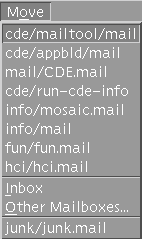
To resolve both of these design issues, we created a menu called "Move". To allow for frequent filing of
messages, the user may customize a portion of the Move menu on a property sheet. The user can build a
custom list of mailboxes, and/or choose to build a list automatically from the most recently used mailboxes.
The custom list and/or the automatically generated list are displayed in the Move menu. The user selects
message(s), pulls down the Move menu, selects a mailbox and releases the mouse button. The messages are
moved.
FIGURE 4.The Move menu is used to file messages into other mailboxes: user-defined
mailboxes appear at the top and recently visited ones are appended to the bottom.
We also gave users a way to move messages to mailboxes not on their Move menu through a choice on that
menu called "Other Mailboxes". This brought up the standard Common Desktop Environment Motif file
selection box. The file selection box allowed users to move or copy their messages to any mailbox in the
file system.
The file selection box represented different functionality from Mail Tool's Mail Files dialog, which not only
allowed moving and copying but other actions such as Open, Edit, etc. This was an interesting point in user
testing because subjects would consistently go to the Move file selection box for other operations, such as
opening a mailbox. This suggested to us that users were perhaps looking for a "universal" type of dialog to
perform mail housekeeping functions. Unfortunately, since the file selection box was an inherited widget
and would be found in other Common Desktop Environment applications, there were limits to the changes
that could be made to it.
The file selection box was not without its benefits. Mail Tool's message filing function assumed that the
user would keep all mailboxes in one physical directory. In this event, the mail filing pop-up menu would
display all mailboxes. However, many users prefer to keep mailboxes in folders associated with their
projects, for example. This led to navigational difficulties. Without a dedicated mailbox directory, the user
would have to navigate through layers of pull-right menus to reach a filing destination. The file selection
box allows users to get to other mailboxes via a simpler navigation model.
Introduction
The interface for this electronic mail application is notable in two respects. First, this e-mail application
(Mailer) was the product of a collaborative effort within and across companies, where the design was
orchestrated among software developers, human interface engineers, and technical writers across the hall
and across the country. In addition, it is a design that incorporates past usability data, new toolkit widgets,
and compliance with a user interface style guide that was being written at the time the interface was being
designed. The story of the design, and the story of the design process, are described in this Design Briefing.
The design of the Mailer application took place against a background of intra- and inter-company
communication and tight deadlines. The Mailer project was a direct result of the Common Open Software
Environment agreement, which was joined by SunSoft and several partners (Hewlett-Packard, IBM, and
Novell, Inc.) in the Spring of 1993. These partners combined forces to design a unified UNIX-based
desktop, referred to as the Common Desktop Environment. The Mailer team was responsible for designing
and implementing the e-mail application for this desktop. Up to this point, the Mailer team had focused on
learning about and accommodating the needs of SunSoft's Mail Tool users and was relatively unaccustomed
to design interaction with other companies. With this agreement, the priorities and plans of the team
changed overnight. One crucial difference was that inter-company teams were formed to manage and
mediate decisions which previously had been the domain of the individual development teams.
Politics and Partners
Following the Common Open Software Environment agreement, processes were put in place to handle the
increasingly complex communications between and within the companies. Inter-company teams were
formed to manage and mediate decisions which previously had been the domain of the individual
development teams. One of these teams was composed of a human interface engineer from each company.
These individuals were responsible for coordinating interface work (design and evaluation) and ensuring a
consistent look and feel, a shared user model, and sound design principles among the desktop applications.
This coordination took place during a weekly conference call. Designs for the Mailer, as well as all
Common Desktop Environment applications were critiqued, approved, and in some cases, debated and
altered by representatives of these inter-company teams.
Major Design Issues
Though nearly every aspect of the electronic mail interface was reconsidered, three areas emerged as major
design issues: the selection model, the ability to edit received messages, and message filing. Video clips will
be shown during the Design Briefing presentation to illustrate some of the more interactive issues (such as
the selection model) and some of the more eclectic and illuminating user behaviors.
Selection Model
Deciding upon the means to select and display messages in Mailer turned out to be the most complex design
task we faced as a team. We realized that we could not carry over the selection model from SunSoft Mail
Tool for several reasons. Some of these reasons seemed to have less to do with selection specifics than with
larger design issues about how messages were displayed and the overall format of the main Mailer window.
We found that only after these larger issues were decided, could we progress to deciding the selection style.
Editable Messages
SunSoft's Mail Tool allows users to freely edit the contents of received mail messages. This quickly became
an issue for the Mailer team, especially when it became apparent that the new selection model would allow
multiple views of one message to be open simultaneously. Multiple views of one message introduced
compelling questions: What would happen to one message when the other was altered? Would the changes
in one message be reflected in the other?
Mail Filing
Virtually all users of electronic mail would agree on one thing: there's too much of it and it needs to be
organized. The ability to easily and quickly file received messages is critical to the success of an e-mail
application. The Mailer team reviewed user testing from SunSoft Mail Tool and saw an opportunity to
improve the mail filing operation, which was confusing to many users.