

G.Viehstaedt, M.Minas
Diagrams, e.g., certain kinds of trees or graphs,
are often needed as part of advanced user interfaces,
and are frequently specific to a user's application.
Editing these diagrams should be possible by direct manipulation.
Some examples of direct manipulation in an editor for
Nassi-Shneiderman diagrams (NSDs) are described.
This sample editor was generated from a specification by
DiaGen , our generator for diagram editors.
Today's Graphical User Interfaces (GUIs) are usually not very graphical,
an assessment also made in a recent CACMissue on GUIs
[1]:
What the market considers a GUI is little more than a glorified
menu system, having no graphics. This leaves the graphical representation
of the application domain as an exercise for the developer, ...
More complex structures in the application domain can often be graphically
represented in an easily comprehensible way by some kind of diagram.
It is desirable to make diagrams part of the user interface
and let a user interactively edit them.
These diagrams may be certain trees for depicting hierarchical relationships,
or graphs, e.g., for finite state machines.
Nassi-Shneiderman diagrams (NSDs) are another classical example.
We use the term diagram class to refer to a specific kind of
diagrams.
An editor tailored to some diagram class is called a diagram editor.
A diagram editor is needed for supporting complex editing operations and
layout. Furthermore, such an editor can ensure that the diagrams constructed
by the user have a valid structure, and thus are meaningful for the
application.
E.g., we may want to provide a window as part of a user interface in which the user
can `write' simple programs by drawing an NSD. Then only well-structured
NSDs are meaningful.
For the implementation of a diagram editor, a tool is necessary in order to
reduce the effort.
Many user interface tools provide no help for diagrams. A few, e.g., Garnet
[2], support basic kinds of diagrams. The structure of a diagram,
however, has to be maintained by the programmer using Garnet and is more
or less hidden in the code.
Context-free grammars have proven an invaluable model for specifying textual
languages.
Grammars would also be useful for describing structure and layout of diagrams.
A grammar-based system is described in
[3], but the editing capabilities are very restricted.
DiaGen is a tool for generating diagram editors from a specification
and is based on a grammar model. The grammar together with the concept for user
interaction makes possible very convenient and powerful editing operations.
A specification of a diagram editor consists of:
A hypergraph grammar is similar to a context-free grammar, but has significant advantages
for specifying a diagram's layout by means of constraints [4].
Editing a diagram means that a user action is mapped to a transformation
which modifies the structure.
A diagram editor for NSDs, which was generated with DiaGen , serves
for demonstrating direct manipulation.
An NSD mainly consists of lines and text blocks
(for statements and conditions).
These diagram elements can be selected in different ways,
which are stated in the specification and thus adapted to the particular
editor.
In our case, subsequent selected statements in an NSD are automatically
combined into a single entity called a group.
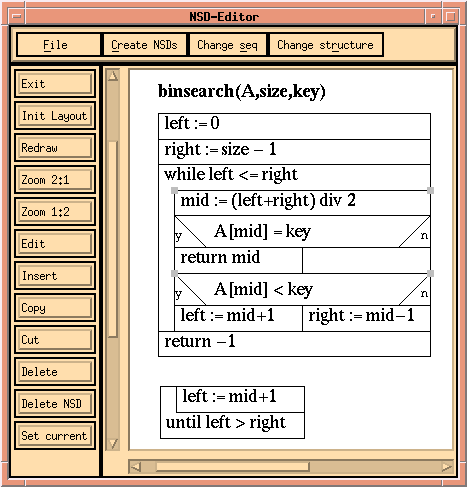
In Fig. 1 a group of two subsequent statements
is selected, as indicated by the handles.
FIGURE 2:
Situation after moving the group selected in Fig. 1
to the beginning of the while.
As an example,
we now want to remove this group from its position and insert it into
the upper NSD as the first statements of the while.
Fig. 2 shows the result.
One way to achieve this is to press the Cut-button,
select the line immediately below the while's condition
to indicate the position for insertion,
and finally press the Insert-button.
This kind of editing is the only way in other systems,
but an editing style solely based on selection and pressing buttons or
choosing menu items can hardly be called direct manipulation of diagrams.
With DiaGen diagram editors offering true direct manipulation can be specified.
E.g., the modification from Fig. 1 to Fig. 2
can also be made by simply pressing the mouse button while the mouse pointer
is located over the selected group, dragging this group to its destination,
and releasing the mouse button over the line below the while's
condition.
This way any part of a diagram
can be removed and inserted at any other spot.
A diagram part can be made a new NSD of its own
in a similar fashion by moving it around and releasing the mouse button
outside any other diagram.
Of course, an entire NSD can also be inserted into another one.
A number of other editing operations by direct manipulation have been
specified for the NSD editor.
E.g., the then- and else-branch of an
ifcan be switched by pressing the mouse button over the if's
triangle with `y' inside, dragging it to the right, and releasing
it over the corresponding `n' (or the other way around).
Another example of direct manipulation is to change
a whileinto an untilby moving the while's condition down to the end of the
while and releasing the mouse button there.
Similarly, an untilcan be modified into a while.
All these editing operations are specified based on the grammar model.
They consist of user actions which are mapped to transformations for
structural changes.
Direct manipulation of diagrams has to be more than selecting items and choosing
operations from a menu. DiaGen generates diagram editors with true direct manipulation
from a specification. The structure of diagrams is specified by a grammar.
Abstract
Keywords:
User interface, direct manipulation, diagram, generator,
syntax-directed editing
Introduction
THE GENERATOR DiaGen
DIRECT MANIPULATION
CONCLUSIONS
References