Abstract
Creating art can be seen as the creative exploration of a
design space defined by the artist and his or her tools.
Existing artistic tools such as paint brushes, chisels and
erasers are of a passive nature stressing a direct
manipulation interaction scheme which leaves the
exploration process strictly to the artist. If these tools
had the ability to be more autonomous, they could
assist in the exploration process, possibly discovering
things that the artist was unaware of. This poster
describes Art Pals, a drawing application which
combines passive drawing tools with active, behavior-
based tools in order to create an artistic environment
more conducive to creative exploration.
Keywords:
Artistic Exploration, Direct
Manipulation, Delegation.
NAVIGATING SUBJECTIVE DESIGN SPACES
Engineering and art can be viewed as points along the
spectrum of design space exploration. Typically,
engineering design calls for the satisfaction of several
constraints involving cost, system requirements,
building materials and many other concerns [3]. Form
is heavily influenced by function, and these constraints
can severely limit the design space to be explored. Art,
on the other hand, is more concerned with form and
aesthetic appeal. The only constraints that need to be
satisfied are those imposed by the selected medium and
the subjective constraints imposed by the artist. Thus,
artistic design spaces can be wide open with lots of
space for creative exploration.
Art Pals is a drawing application developed in
Agentsheets, a programming substrate for creating
visual design environments [1]. Art Pals takes
advantage of Agentsheets participatory theater
interaction scheme [2] by providing a combination of
active and passive tools (the "pals" Figure 1). These
tools can be used in concert to effectively explore
subjective design spaces. The user can establish
constraints by drawing with the passive pals, and can
then delegate exploration tasks to the active pals. In Art
Pals, pictures are not so much drawn as they are "acted
out" by a troupe of pals. The user assumes the role of
"actor/director" and can choose how much acting and
how much directing he or she will participate in.
FIGURE 1: The Art Pals
THE PALS
To draw in Art Pals, the user must enlist the support of
the seven different pals. Each pal possesses a unique
behavior which can belong to one of two categories:
passive or active. Passive behavior is embodied in the
Passive pal which acts like a traditional direct
manipulation drawing tool. Passive can be assigned a
color and then will draw on a worksheet only when the
user explicitly drags it. Passive is the pal which gives
the user the highest degree of control and requires the
highest amount of user effort. The other six pals are
active because they can draw under their own initiative.
Active pals are placed in a worksheet by the user, and
then can draw without having to be manipulated.
Active pals can be broken down further into two
categories: autonomous and reactive.
Autonomous Pals
The autonomous pals are Random, Straight and Angle.
They will not draw on a worksheet space that has
already been colored, and if they get to a point where
there are no viable spaces to move to, they will stop
drawing. Random draws on the worksheet in a random
fashion, while Straight draws in a straight horizontal
line until it reaches an impediment. An impediment can
be the edge of the worksheet or another pal. Once this
happens, Straight will drop down to the next line
(provided there is an empty space), change directions,
and continue drawing lines. Angle will move in straight
lines until it reaches an impediment. Then, it will rotate
counter-clockwise by a user specified angle, and
continue drawing in its new direction. Both Angle and
Straight are assigned initial directions by the user.
Reactive Pals
Reactive pals draw by reacting to the drawing activity
of the user. Imitate, Opposite and Flock operate by
waiting until the user has drawn something and then
reacting accordingly. Imitate will imitate exactly what
the user did, while Opposite does the opposite. Flock
pals draw by moving from where they are on the
worksheet to where the user activity is taking place. In
other words, they flock to the Passive pal that the user
is manipulating. Unlike autonomous pals, the reactive
pals will draw over previously colored worksheet
spaces.
ART PALS EVALUATION
Art Pals has been informally evaluated with several
different users including a professional artist. A
portfolio of drawings exists, and Art Pals has proven an
interesting medium with which to study the way people
explore artistic design spaces.
Balancing Exploration and Constraints
Upon first drawing in Art Pals, users tend to rely less
on establishing constraints, and more on exploration.
This is borne out by the random nature of the early
drawings that people make. As the users become more
familiar with the system and the different pals, they
tend to spend more time developing and adhering to
constraints. Eventually, most pictures start out with
some engineered components and then incorporate
exploration as the drawings evolve.
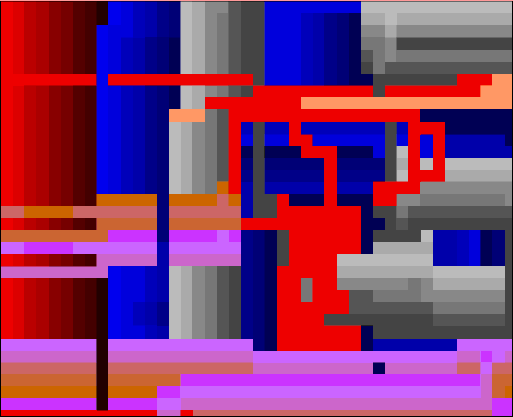
FIGURE 2: Art Pals Drawing
An example of this can be seen in Figure 2. This
drawing was the third created by the professional artist
I worked with, and at this point he had become
comfortable with the application and knew how each of
the pals behaved. He started this picture by creating a
horizontal string of Imitate pals in the upper left corner
of the worksheet. He assigned the Imitate pals colors
along different spectra in order to create a shaded, three
dimensional quality. Then, by drawing a vertical line
with a Passive pal, the Imitate pals followed, creating
the column-like structures on the left side of the picture.
These columns had been carefully engineered by the
artist, but at this point he began experimenting by
rearranging the Imitate pals vertically, and by using
Flock pals to create the random lines in the middle of
the drawing. At this point he said, "I don't know where
this is going, but we'll see!"
Levels of Exploration
Different people prefer to use different levels of
exploration. Some users tend to take a more exploratory
approach while others like their drawings to be more
carefully constrained. This usually manifests itself in
the way users view their roles. For instance, some users
organize their drawings around discrete steps. One part
of the picture is carefully arranged and then executed.
Another aspect of the picture is then arranged, and the
action takes place again. This approach highlights the
user's role as director and minimizes the role as actor.
In this style, each "scene" is carefully arranged and
executed, and then the next scene takes place. Other
users prefer to be more of an actor, in the midst of the
activity. The actor approach tends to produce more
exploratory results.
CONCLUSION
Although different users interact with Art Pals
differently, all of the users tested appreciated the ability
to delegate certain drawing tasks to the active pals.
Frequently, the results of this delegation were not fully
anticipated by the user but were often incorporated into
drawings. By providing an environment that allows the
combination of passive and active tools, Art Pals assists
in the creative exploration of an artistic design space by
having tools that can generate options the user may not
have been aware of.
Acknowledgments
This research was supported by Apple Computer Inc.
and the National Science Foundation under grant No.
RED-9253425.
References
1. Repenning, A., "Agentsheets: A Tool for Building
Domain-Oriented Dynamic, Visual
Environments," University of Colorado at
Boulder, Ph.D. dissertation, Dept. of Department
of Computer Science, 1993.
2. Repenning, A. and T. Sumner, "Programming as
Problem Solving: A Participatory Theater
Approach," Workshop on Advanced Visual
Interfaces '94, Bari, Italy, 1994, pp. 182-191.
3. Simon, H. A., The Sciences of the Artificial, MIT
Press, Cambridge, MA, 1981.