Abstract
This paper describes the design process of an innovative digital 3D
paint program. The system enables industrial designers to paint
surface details directly on rough 3D models for the first time.
Contextual inquiry into designers' work inspired a real-world metaphor
of painting a physical model. This provided the foundation for making
3D tools as natural to use as 2D. Familiar 2D digital painting
paradigms, such as brushes, layers, and masks, were extended to 3
dimensions without adding complexity to the interface. Our informal
evaluation sessions have shown that with a cursory introduction,
designers who have never seen the interface were able to paint 3D
models as easily as they could sketch. Keywords 3D painting,
contextual inquiry, direct manipulation, texture mapping
Introduction
With the growing use of computer-based 3D modeling tools by industrial
designers, there is an increased demand to integrate painting surface
detail with the conceptual design phase of product development. The
process of texture mapping is currently available to add visual detail
to a 3D shape without modeling. However, it is typically restricted
to after-the-fact cosmetics rather than an integral part of the design
process due to a complicated and indirect two-step interface. First,
an image is created in a 2D paint package. The image is then
projected onto a model using geometric mapping techniques in a
modeling package. Since few complex surfaces match basic geometric
shapes, the projection often fails, producing undesirable distortions
such as stretching and seamlines[1]. The designer is then faced with
the trial-and-error process of painting and aligning the image on the
model to undo the distortions.
Research by Hanrahan and Haeberli explored an alternative method to
paint directly on 3D shapes[2]. Their technique disregards the
advantages of texture mapping by adding polygons to support the
painted detail. The weight of the model can grow rapidly with each
paint stroke. Although this method enables direct painting, it is
impractical for rapid iterative design. Interactive performance is
greatly decreased and more importantly each design alternative
requires a unique model.
This paper describes the design of a 3D paint system that has been
embraced by designers. It lets them work in their natural environment
rather than focus on the mechanics and artifacts of technology.
Designers can use familiar 2D and 3D techniques, such as airbrushing,
patterning, and decaling to paint directly on 3D models. The paint
interacts with the model surface and lighting environment to create a
realistic representation.
CONCEPTUAL MODEL
We began to explore the system design using contextual inquiry to
observe the work of two sets of users[3]:
- The first group were industrial designers using traditional techniques
to hand paint physical prototypes. They used painting, masking and
decaling to increase the realism of prototypes for evaluation.
- The second group were 2D and 3D computer artists working in
entertainment and multimedia markets. The 2D artists use digital
painting software to create images that are texture mapped onto the
shapes modeled by the 3D artists.
Observing the work practice of these two domains provided both a
traditional user model and an electronic system work model. The
computer artists' work model is clearly embodied in the system
itself[4]. Their work is more complicated than needed because they
must account for the 3D distortions while painting in 2 D as shown in
Figure 1.
Industrial designers' work practice inspired a real-world metaphor of
painting a 3D model. We then abstracted this concrete metaphor to
electronic media to eliminate the mechanics and artifacts of texture
mapping. Most importantly, this new paradigm enables rapid design by
integrating all aspects of the 3D creative process as shown in Figure
2.

Figure 1 (No caption provided)
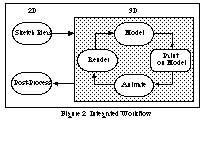
Figure 2 (No caption provided)
We tested this conceptual model with both target user domains. The
model was familiar and attractive to the industrial designer.
However, the 2D computer graphic artists initially resisted the
change. Not only did they fear that much of their expertise would be
unnecessary, but they felt working in 3D would be too complicated.
Only when were able to show them a much more detailed prototype did
they embrace 3D painting.
DETAILED DESIGN
Guided by what we learned from contextual inquiries into real-world 3D
painting, 2D digital painting and 3D computer graphics, we set out to
design the details of the system. Our primary goal was to make 3D
painting as easy to learn and use as 2D and to make the integration of
the two seamless. A secondary goal was to impose as few constraints
as possible since we cannot predict the ways users will apply this new
technology.
Our approach was to abstract the existing paradigms of 2D digital
systems into 3 dimensions using the traditional painting techniques of
3D designers as a guide. We wanted to develop a suite of direct
manipulation tools that would not simply mimic the standard toolset
but would instead offer flexible new behaviors to enhance the creative
process.
We started with layers, digital equivalents to transparent sheets of
vellum that allow a designer to experiment freely by isolating
changes. Using a shrinkwrap metaphor we extended flat layers to
conform to a model's surface. Conventional 2D masks were abstracted
to live on the surface of the model and thus duplicate the use of
masking tape to paint a straight edge. We extended digital 2D pasteup
to allow decals to slide over a model's surface conforming to its
shape while rotating and scaling the artwork.
The next key question was how the user would switch between painting
2D or 3D. The most obvious solution is for the user to specify
whether they are painting a model or an image, but this does not allow
the flexibility to mix and match 2D and 3D effects. We explored
creating separate 2D and 3D layers but this imposed too many
constraints and was overly complicated. The simplest and most
flexible solution was to add a 2D/3D button. All tools including
brushes, washes, masks and pasteup either paint on a flat canvas or
conform to the underlying 3D shape depending on the setting. By
adding one button, we introduced a new functional area and let the
user switch back and forth with ease.
We evaluated these designs with scenarios derived from the contextual
inquiry and with informal usability testing at our site and the users'
workplace. Using an early prototype, designers who had never seen the
interface painted models with only a cursory introduction and even
competed for the best 3D painting at a national design conference.
The integration of 3D turned out to be so natural to many traditional
designers that they did not realize they were using a 3D product.
DISCUSSION
We have shown how contextual inquiry can contribute to designing
easy-to-use 3D products. By grounding our design in the user's work
practice, our early findings have shown that we were able to
successfully match to the user's model. Users can focus on their jobs
instead of the mechanics and artifacts of technology. We will be
conducting more rigorous usability studies in design studios to test
these findings.
In the future, we would like to incorporate more physical qualities of
paint, painting techniques and surfaces such as viscosity or
thickness, 3 dimensional positioning of airbrushes, and surface polish
or roughness to make the user metaphor richer and more realistic.
References
1. Foley, J. and van Dam, A. Computer Graphics: Principles and
Practice. Addison-Wesley, New York 1990.
2. Hanrahan, P. and Haeberli, P. " Direct WYSIWYG Painting and
Texturing on 3D Shapes", in Proc. SIGGRAPH'90 (August 1990), ACM
press, pp. 215-223.
3. Holtzblatz, K. and Jones, S. "Contextual Inquiry: A Participatory
Technique for System Design," in Participatory Design: Principles and
Practice. Aki Namioka and Doug Schuler (Eds.), Hillsdale,
N.J.:Lawrence Earlbaum Pub. 1993.
4. Norman, D. The Psychology of Everyday Things. Basic Books, New
York 1988.