Abstract
Apple Guide, the new online help system in Macintosh
system software, provides a standard human interface to
online help on the Macintosh. It is the culmination of
extensive study at Apple of how users can work most
effectively with online help. This paper summarizes
several of the major studies in Apple's research, briefly
describing the research methods used, major findings, and
how those findings contributed to the design of Apple
Guide.
Keywords:
Online help, user studies, instructional
design.
CATEGORIZING USERS' QUESTIONS
Although the exact origins of Apple Guide are difficult to
trace, a strong early influence was work done by Apple's
Human Interface Group in 1987. The Human Interface
Group reviewed literature on help, looked at existing help
systems, and conducted videotaped studies of user
behavior.
In one study users were observed thinking aloud while
performing tasks in HyperCard. Users' questions were
then classified into five general forms: goal questions
("What kinds of things can I do with this program?"),
descriptive questions ("What is this? What does this do?"),
procedural questions ("How do I do this?"), interpretive
questions ("Why did that happen?" "What does this
mean?"), and navigational questions ("Where am I?").
In a follow-up study, users were asked to perform tasks
using MacDraw. This time they used a prototype help
system that required them to frame questions by first
clicking one of three buttons corresponding to common
question types: "How do I�?" "What is�?" and
"Why�?" (A fourth button allowed users to type their
own questions, in case none of the predefined categories
was adequate.) The researchers found that the categories of
"How do I�?" "What is�?" and "Why�?" were adequate
to cover almost all of the subjects' questions. They also
found that "How do I�?" questions were asked most
frequently.
This categorization of question types has influenced the
function of items in the Guide menu on the Macintosh.
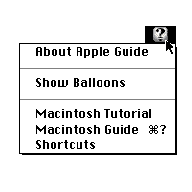
Figure 1. The Guide menu for the
Macintosh Finder
For instance, Balloon Help - which allows users to identify
objects on the screen by pointing at them - was designed
specifically to answer "What is�?" questions. Apple
Guide can accommodate any type of question, but it is
primarily designed to answer "How do I�?" questions.
DESIGNING A HELP ACCESS SCREEN
In subsequent studies, the Human Interface Group
investigated designs for screens that would allow users to
access specific help topics.
In the first round of testing, users worked with a prototype
that let them construct a question by choosing a question
type (such as "How do I�?"), an action (such as "delete"),
and an object (such as "paragraphs"). The researchers
found that the function of this access screen was not
obvious to users. Several users did not see the actions and
objects as components for building a sentence.
That led to the design of an access screen based on the table
of contents of a book. Information was organized in a two-
level hierarchy on a single screen. When the user clicked a
task on the left, a list of associated subtasks appeared on the
right. Users said they preferred this design because it was
easy to scan and allowed them to easily backtrack if they
clicked a topic they didn't want.

Figure 2.
Example of an Apple Guide help access screen
In 1990 Apple's Instructional Products group, working in
tandem with the User-Aided Design group, tested more
fully developed models for help access screens. They
tested four different prototypes, each with some
combination of the following options:
- a topics screen that lets users click an item in a short list
of broad topic categories (like the table of contents in a
book) to see a list of related questions
- an index screen that lets users click an item in a long
alphabetical list of topics (like the index in a book) to
see a list of related questions
- a "Look For" screen that lets users type a word or
phrase, then click a Search button to see a list of related
questions
The researchers found that all three access screens were
useful. Novices preferred the topics screen because it
didn't require them to know specific computer
terminology. Experts preferred the index because it let
them narrow in on a specific topic more quickly. Experts
also liked the Look For screen when the word they had in
mind wasn't listed in the index. Based on this feedback, all
three options are available in Apple Guide help access
screen.
STEPPING USERS THROUGH TASKS
Of course getting users to ask the right questions is only
part of the problem; a help system has to give users
answers in a form they can use.
Early prototypes designed by the Human Interface Group
presented instructions in a small window of text. Users
could page forward or backward by clicking right arrow
and left arrow buttons. There were no scroll bars because
scrolling would disturb the intended layout of the
information.
A similar interface - in which users paged through screens
of instruction by clicking arrow buttons - was used in the
Macintosh Electronic Reference, a HyperCard version of
the system software reference manual developed by
Instructional Products. User testing of the Macintosh
Electronic Reference illuminated many of the problems
with traditional forms of online documentation:
- When users invoked help, they switched out of the
application they needed to use to complete their task.
- When users tried to follow the instructions, they
switched out of help, and their instructions were often
covered by another application's windows.
- Because of the two problems just noted, users had to
read and remember a series of instructions before they
tried to perform them.
- Users often got out of step with the instructions,
sometimes failing to perform instructions.
- Users were confused by the illustrations in the
instruction windows, mistaking them for functioning
interface elements that they should click.
Based on these experiences with more traditional forms of
online information, the fundamental design goals for Apple
Guide were established:
- Help should appear in the same application layer as the
application being used to complete the task.
- Instructions should be presented in small chunks to
minimize the user's reliance on memory.
- When a user fails to perform an instruction, the help
system should send the user back to that instruction (or
do the step automatically).
- When an instruction has already been completed by the
user, the help system should skip over the instruction.
- Rather than showing an illustration of an object on the
screen, the help system should point out the actual
object (by drawing a circle around it).

Figure 3.
Example of an instruction in Apple Guide
In 1991 the design team began building prototypes in
SuperCard for a simple drawing program with a fully
functioning help system. In each round of testing, users
were asked to create a drawing, thinking aloud as they
worked.
The team conducted seven rounds of prototyping, testing,
and revision. To measure the effects of changes to the
design, the team tracked the frequency of critical incidents.
For example, in early rounds of testing some users had
difficulty locating the right arrow for moving forward.
Problems such as this were identified as critical incidents,
and their frequency was tracked in subsequent studies. As
the design evolved, the frequency of critical incidents
diminished to an acceptable level.
By 1992 the first working version of the Apple Guide
system extension had been engineered, enabling the team to
observe users interacting with a prototype help system for
the Macintosh Finder. By this point the software interface
was fairly well established, so the focus shifted to how to
best represent users' questions and how to write clear and
concise instructions to guide users through tasks.
By the fall of 1994, Apple Guide began shipping with
Macintosh computers. The focus of user studies of Apple
Guide now shifts from the lab to the field, with plans in the
works for field studies, phone surveys, and automated data
collection.
FOR MORE INFORMATION
Anyone interested in developing an Apple Guide help
system should contact APDA, Apple's source for developer
tools, at apda@applelink.apple.com.
Acknowledgments
The information in this paper was gathered from Apple
internal technical reports. The author would like to
acknowledge the people who contributed to those reports:
Kathleen Gomoll, Tom Gomoll, Jeffrey Herman, Jeremy
Hewes, Glenn Katz, Kristy Knabe, Anne Nicol, Jim
Palmer, Abigail Sellen, Mike Thompson, John Trumble,
and Irene Wong.