


Carnegie Mellon University
Pittsburgh, Pa 15213
fmm@cs.cmu.edu
ac21@andrew.cmu.edu
bam@cs.cmu.edu
To address this, we are investigating ways to represent the evolving
program while the user is demonstrating it so that users know what the
system has inferred (by observing the growing program representation)
and can interactively learn the syntax and semantics of the language.
By allowing a program to be edited and saved, users can have an
artifact to later examine, edit and share.
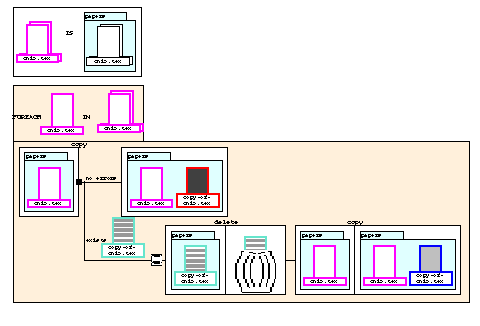
The state-based language (Fig. 1) uses a comic strip metaphor. Data are
represented with icons. Operations are implicitly represented by
changes to data icons. Control constructs are represented by
graphical objects. A program is a series of operations and control
constructs. Essentially, programs are static representations of the
dynamic changes to data.
Figure 1.
A program in state-based language that copies each *.tex file in the
papers folder. If copy fails because a ile with the output file name
exists, the program deletes that old file, and re-executes copy. The
outer rectangle enclosing the operations represents the loop, and the
little black square and diverging lines represents a conditional
branch.
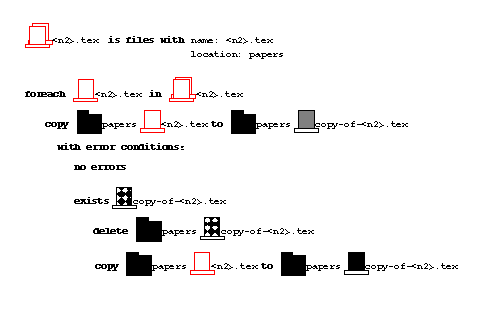
The text-based language (Fig. 2) has a verb/argument structure.
Data are represented with familiar icons. Operations consist of a
name followed by data icons. Control constructs are represented with
keywords and indentation. A program is a list of commands and control
constructs. Essentially, programs describe how data is manipulated.
Figure 2.
The program in Fig. 1 represented in the text-based language. The
loop is represented by a combination of keywords (foreach) and
indentation of operations indicating its scope. A similar combination
represents the branch on the outcome of the copy operation (with error
condition:).
Although conceptually different, the languages are functionally
equivalent. There is a 1-to-1 mapping between their commands and
constructs. Moreover, actions to construct programs are
identical across the languages so that the concepts users need to
learn do not vary between the languages.
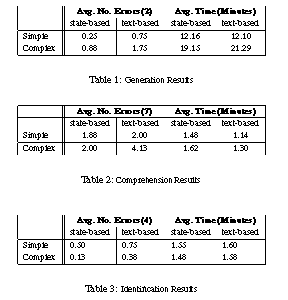
In the comprehension study, users were presented with 14 (task
description, program) pairs and had to decide if the program was
correct or contained a bug. Table 2 summarizes the results. All
subjects did well, with the state-based group performing better for
complex programs (t(14)$=$1.84, p$<$.04), and the text-based group
performing significantly faster (F(1,28)$=$6.44, p$<$.02).
In the identification study, for each of 8 task descriptions, users
indicated which of 4 programs implemented the task. Table 3
summarizes the results. All subjects did well, and ANOVAs revealed no
reliable main effects or interactions.
We were surprised to see the great effect that language had on users'
ability to generate programs, since the user actions in constructing
programs are identical across languages. One reason could be the
representation of control constructs in the state-based language. The
fact that users in the text-based group rarely constructed complex
programs correctly and did much worse for complex programs in the
other studies suggests that possibly the state-based representation of
loops and conditionals enhanced users' understanding of these
concepts. Responses in a post-study questionnaire support this. The
state-based group cited branches (4 users), loops (2) and operations
(2) as the most intuitive features in the language, whereas the
text-based group cited only files and folders.
We plan a future study that establishes users' understanding of
programming concepts at various points, and that focuses on the
micro-structure of the languages to see if the graphical
representations of control constructs affect comprehension. This
study should also help us determine what features of the two languages
make them successful for particular user tasks.
Abstract:
For Programming by Demonstration (PBD) systems to reach their
full potential, a program representation is needed so users can view,
edit and share programs. We designed and implemented two equivalent
representation languages for a PBD desktop similar to the MacIntosh
Finder. One language graphically depicts the program's effects. The
other language describes the program's actions. A user study showed
that both languages enabled users with no prior programming experience
to generate and comprehend programs, and that the first language
doubled users' abilities to generate programs.
Keywords:
End-User Programming, Programming by Demonstration,
Visual Language, Visual Shell, Pursuit.
Introduction AND MOTIVATION
A visual shell, e.g., the Macintosh Finder, is a direct manipulation
interface to a file system. Although easy to use, these interfaces
lack of a way for users to automate repetitive tasks. The Pursuit
visual shell [2] is exploring ways to provide programming to
non-programmers in a way that is consistent with the direct
manipulation paradigm. Pursuit is a Programming by Demonstration
(PBD) system [1] that infers a program as the user
executes actions on real data. Many PBD systems have shown promise in
enabling non-programmers to automate tasks (e.g., SmallStar,
Metamouse,Eager, Mondrian), but they admit a well-known shortcoming:
how to represent the resulting program to end users. Without a
representation, users cannot verify inferences, review or modify a
program.
THE TWO REPRESENTATION LANGUAGES
To construct a program in Pursuit, users demonstrate the program's
actions on pieces of data. As the user executes each operation,
Pursuit presents the evolving program in a special program window in
one of two representation languages.
EVALUATION STUDY
Sixteen non-programmers were randomly assigned to the state-based or
text-based group. In the generation study, users were given 4 task
descriptions -- 2 simple tasks, containing no loops or conditionals,
and 2 complex tasks, containing both a loop and a conditional -- and
asked to constructs programs. Table 1 summarizes the results. A
two-way ANOVA showed that the state-based group was twice as accurate
in generating programs, F(1,28)$=$13.00, p$<$.002. All subjects were
more accurate (F(1,28)$=$9.31, p$<$.005) and faster (F(1,28)$=$12.90,
p$<$.002) when constructing simple programs.
DISCUSSION AND CONCLUSION
Although preliminary, the results are promising. Both groups
generated and comprehended programs, demonstrating that combining PBD
with an editable program representation does help non-programmers
access the power of programming.