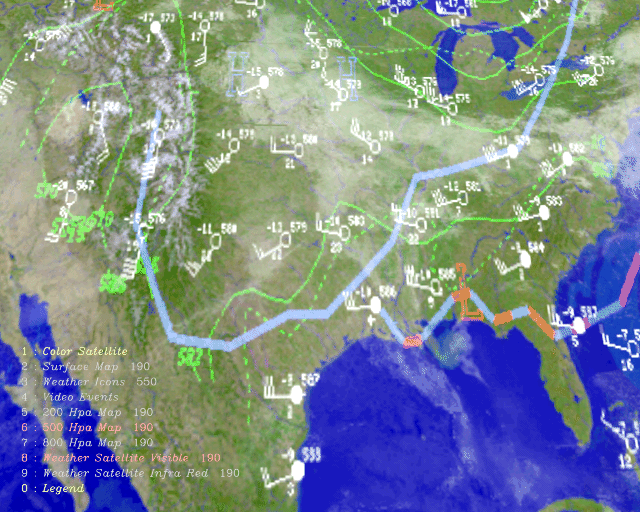





Transparency and blur has proven to be a very effective method of enhancing
layers and isolating interesting objects [3]. If an object in a foreground
plane is displayed razor-sharp over a blurred background, it will "pop" out at
you as if it is floating. Other work, such as "Back to the Future: A Graphical
Layering System Inspired by Transparent Paper" [1] has combined transparency
with layer movement to enhance visual selectivity. This project would allow the
user to grab a layer's handle and move it around to see what members it
contained -- as you would probably do with layers of translucent paper or
overhead transparencies.
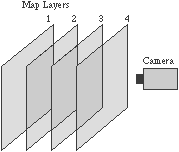
Camera movement is a very effective way to separate layers because it has
worked well for us in nature for so long (as eye, head, and body movement). As
you move through space, objects that are closer to your eye seem to move by
faster than objects further away -- this is perspective vision.
Figure 1. Schematic view of operation
Because Livemap was designed to run on a machine which offers real-time
operation and additional features such as stereo and 3D graphics, these
enhancements were used to further improve the interactivity and
comprehensibility of information.
When many layers of information are simultaneously displayed, the resulting
image may be difficult to understand because your eye confuses them with one
another. Livemap uses variable transparency combined with three techniques to
help improve data comprehension as the information density is increased: layer
jitter, camera movement, and stereo.
Layer jitter introduces sinusoidal movement with a constrained random period
independently to each layer. Because the movement of each layer is slightly
different, it is easier to see each as an independent component and to see the
objects on a given plane as being related. This jitter provides results similar
to a user grabbing a handle and directly manipulating a layer's position as in
[1], but does not require manual intervention.
Camera movement has proven to be especially valuable to Livemap's interface.
Because the individual planes are represented in three dimensions at different
depths, side to side camera movement allows the user to see the
depth-relationships and spatial organization of each component on a two
dimensional display and to see around obstructions. Camera movement facilitates
the simultaneous perception of the spatial organization of all data instead of
just a single layer's contents as in [1].
Finally, I have implemented stereo viewing using Crystal Eyes LCD glasses. The
effect is very powerful because it not only helps the eye separate the layers
but really provides the ability to "see through" foreground layers without
needing to fade them out.
Abstract
Livemap dynamically combines related components of time-varying data to provide
a context-relevant view into an information landscape. Livemap facilitates a
display of increased density by layering content that contains transparent
elements and provides utility to help abstract areas of interest. Keywords:
Layers, transparency, planes, visualization, stereo.RELATED RESEARCH
Much work has been done to increase the amount of comprehensible information
contained within a limited display space. Transparency has been used to prevent
foreground interface elements from totally obstructing background content as in
"Toolglass and Magic Lenses: The See-Through Interface" [2]. Distortion has
been used to emphasize relevant information as in "Graphical Fisheye Views of
Graphs" [5]. Layering information is also very useful for increasing the
density of a display but really succeeds when combined with other techniques
used to isolate contextually relevant objects.
VISUALIZATION TECHNIQUES
Livemap is similar to work previously done at the Visible Language Workshop.
Researchers at the VLW have created a mapping demonstration that uses the
Connection Machine II massively parallel computer to composite multiple layers
of map elements with transparency and blur in real time [3]. Another project
has combined translucency with zooming and panning to composite related
displays and provide an even richer, though non-real-time, information space
[4].
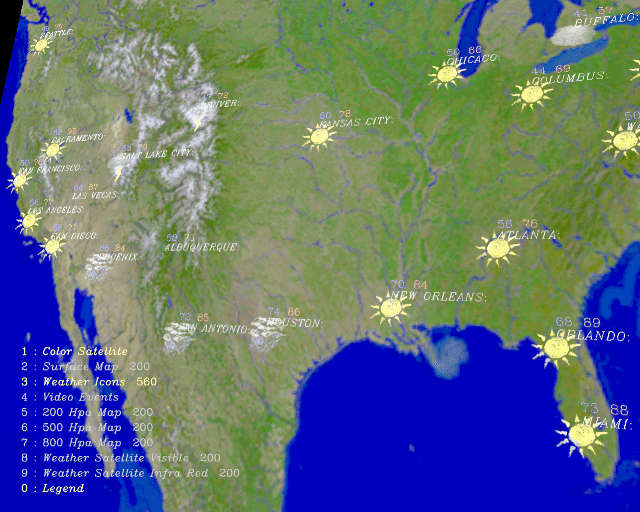 Figure 2. Layers 1, 3, and 0.
Layers
Layers are composed of images, images with transparent areas, 3D geometry,
video, text, and status displays. Each layer is a different distance from the
"camera" in a 3D space and may be faded in and out as desired.