




Victor Kaptelinin
Department of Informatics, Ume� University,
S-901 87 Ume�, Sweden
+46-90-165927
email: vklinin@informatik.umu.se
Besides their immediate practical implications, empirical studies of
windows design features can give important data on how the user
integrates visible and invisible information provided by the
computer. This data, in turn, can shed light on the basic mechanisms
underlying coordination of mental models with external
representational tools in computer mediated activity [4].
The objective of the study reported below was to test two potential
drawbacks associated with the traditional scroll bar design: (1) the
decomposition of the window movements across its content into a
horizontal component and a vertical component which might require
extra time and might make navigation less intuitive and (2) the lack
of a holistic representation of the window content which might
cause disorientation of the user. It was hypothesized that
employing techniques which allow "one move" scrolling and
provide an overview of the window content can make navigation
more efficient.
Subjects worked through a series of tasks. In each task they were
presented with a sequence of four object "names." They were
required to retrieve corresponding letters, which composed a four
letter English word, and to enter this word into the computer. In
order to solve these tasks subjects had to navigate the window
across the picture.
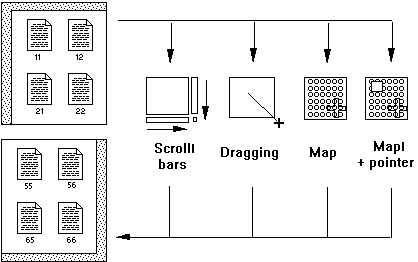
FIGURE 1. Four navigation techniques (in this example they are used
to move the window from the top left corner to the bottom right
corner of the picture).
In different blocks of tasks subjects were provided with four
different types of navigation tools/ techniques, which corresponded
to four conditions of the experiment, see Figure 1. Under the "Scroll
bars" condition subjects used standard Macintosh scroll bars. Under
the "Dragging" condition they could drag the window to different
locations within the picture. When the cursor was in the window
holding the mouse button down and moving the cursor outside the
window caused the window to scroll in the direction opposite to
that of the mouse movement. The scrolling speed was higher the
larger the distance from the window border was. Under the "Map"
condition a "bird's eye view" of the whole picture appeared when the
mouse button was pressed and held down. The names of the objects
were unreadable because of the size of the map. Releasing the mouse
button at a point on the map moved the window directly to the
corresponding location within the picture. The only feature
differentiating the "Map plus pointer" condition from the "Map"
condition was a square-shaped pointer indicating the current
location of the window within the picture.
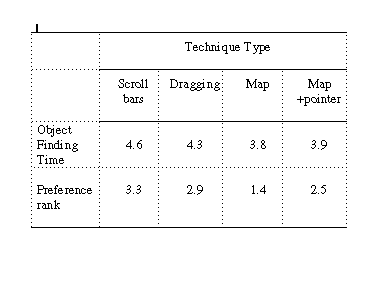
TABLE 1.
Mean times, in seconds, and mean preference ranks for
experimental conditions
ANOVA run on the Object Finding Time variable produced significant
effect of the Technique Type factor (p< .0001). Scheffe F-test
revealed significant (99%) differences between all experimental
conditions with the exception of the difference between "Map" and
"Map + pointer" conditions. The subjective preference data were in
accordance with the performance results: higher preference ranks
were assigned to faster navigation techniques.
This general tendency is complicated, however, by individual
differences between the users. Even in the small sample of subjects
participated in the study there was one user who demonstrated the
highest performance level under the "Dragging" condition, and there
were two other users who demonstrated the lowest performance
level under the same condition. There was even more diversity in
subjective preference data. It can be concluded that it would be
difficult, if possible at all, to find a single window design optimal
for all users.
Finally, it should be noted that in the present study subjects could
calculate the location of an object from the object's name, which
could determine the superiority of the "Map" condition. In most real
life situations this strategy is not possible. This raises the question
of whether the advantage of "bird's eye view" navigation is limited
to one special kind of graphical representation. From my point of
view, the answer to this question should be negative. It appears that
overview-based navigation techniques can be effective over a wide
range of environments because when a graphical layout is familiar
enough, the user can connect objects' names to their spatial
locations even if these names do not contain explicit location clues.
2. Erickson, T., Salomon, G. Designing a desktop information system:
observations and issues, in Proc. CHI'91 Human Factors in Computing
Systems (New Orleans, April 27 - May 2, 1991), ACM Press, pp. 49-
54.
3. Furnas, G. W. Generalized fisheye views, in Proc. CHI'86 Human
Factors in Computing Systems (Boston, April 14-18), ACM Press,
1986, pp. 16-23.
4. Kaptelinin, V. Activity theory: implications for Human Computer
Interaction, in M. D. Brouwer-Janse and T. L. Harrington, eds. Human-
Machine Communication for Educational Systems Design. Springer,
Berlin, 1994, pp. 5-16.
5. Okada, K.I., Kinoshita, K., Matsushita, Y. Scrolling or leafing
through: BookWindow, in Proc. 1st Moscow International HCI'91
Workshop (Moscow, August 5-9, 1991), ICSTI, Moscow, pp. 242-248.
6. Preece, J., Rogers, Y., Benyon, D., Holland, S., Carey, T. Human -
Computer Interaction. Addison-Wesley, Wokingham, England, 1994.
7. Shneiderman, B. Designing the User Interface. Strategies for
Effective Human-Computer Interaction, 2nd edition. Addison-Wesley,
Reading, Massachusetts, 1992.
Introduction
A common problem faced by most computer users is that windows
can often only display part of their full content. The standard user
interface components intended to help the user solve this problem
are scroll bars and their modifications (see, e.g., [6]). Numerous
attempts have been made at providing a technique which can be used
instead of, or as a complement to, scroll bar navigation for the
presentation of rich visual information within a limited screen
space. Alternative approaches include, among others, map windows
[1,2], which were found to have advantage over scroll bars [1],
fisheye views [3], and book metaphor [5]. However, the specific
limitations of standard windows are still not clear, as evidenced by
Shneiderman's comment: "advantages and disadvantages of [windows]
design features are still poorly understood" [7, p. 362].
METHOD
Subjects. Eight subjects from 26 to 50 years old, experienced
computer users and fluent English speakers, participated in the
experiment.
Materials.
A HyperCard stack providing a simple interactive
environment was used in the study. Subjects worked with a picture
representing 36 graphical objects on a square field. The objects
looked like standard Macintosh document icons and were organized
into a matrix of 6 rows and 6 columns. The "names" of the objects
consisted of two digits, the object's row number and the object's
column number. The picture could be seen through a square window
which had linear dimensions of one third of those of the whole
picture, so that only one ninth of the picture content could be
displayed in the window. Clicking on an object caused the display of
the object "content," namely, a character.
Design.
A sequence of four blocks was selected for each subject
individually, according to a Latin Square plan. Each block consisted
of a learning phase (10 tasks) and the main phase (30 tasks). Data on
the nature and on the time of every user's action (in ticks, one tick =
1/60 sec) were collected in a log file. At the end of the session
subjects evaluated the four techniques according to their general
preferences by assigning ranks from 1 (most liked technique) to 4
(most disliked technique).
RESULTS
Table 1 shows mean times elapsed between exposing an object name
and clicking on this object (Object Finding Time variable) and mean
preference ranks for 4 experimental conditions.
DISCUSSION
The results of the experiment are in agreement with the initial
hypothesis. When subjects could scroll a window without
decomposing the movement into two components ("Dragging"
condition) the window navigation was faster then navigation with
the use of the standard scroll bars. Adding an overview of the
picture ("Map" and "Map + pointer" conditions) made the window
navigation still faster.
Acknowledgments
I would like to thank John Waterworth and Edward Gould for
valuable comments on an earlier draft of the paper, and all the
subjects who volunteered for the study for their time and efforts.
References
1. Beard, D., Walker, J.Q. Navigational Techniques to Improve the
Display of Large Two-Dimensional Spaces. Beh. Inf. Techn., 9(6),
1990, 451-466.